Tool we made

Native clipboard memory app for Mac and iPhone users

Description

We designed and built SyncPocket, a local-first native Apple product that turns clipboard history into searchable, organized and reusable working memory across macOS and iOS.

Product

SyncPocket — native Apple app

Year

2026

Scope

Product strategy, UX/UI, Swift, SwiftUI, AppKit, UIKit, CloudKit and launch

Live product

SyncPocket

Open live ↗
What we built

A private second memory for the small things that keep work moving.

SyncPocket was created around a small, repeated loss: a link, answer, file, phone number or image disappears the moment something else is copied. Recovering it means reopening tabs, searching conversations or recreating work that was already done.

We turned that moment into a native product for macOS and iOS. The app captures useful clipboard formats, makes them searchable in seconds and adds organization, retention and recovery without moving the core experience into a browser or making private work dependent on a public database.

01

From a one-item clipboard to working memory

We started with the real workflow rather than a list of features. People in design, sales, support and operations constantly move fragments between applications, but the system clipboard remembers only the newest one. The cost is distributed across dozens of tiny interruptions that are rarely measured.

SyncPocket records text, rich text, links, images, files and HEX colors as structured items. Each format keeps the information needed for a useful preview and later action, turning an invisible technical buffer into a practical layer of daily work.

  • Text, RTF, links, images, files and HEX colors
  • Readable previews instead of an undifferentiated log
  • Fast recovery without returning to the source application
  • A product model designed around repeated micro-workflows

Business result: less context switching and less time spent searching for information that a team member already had a moment earlier.
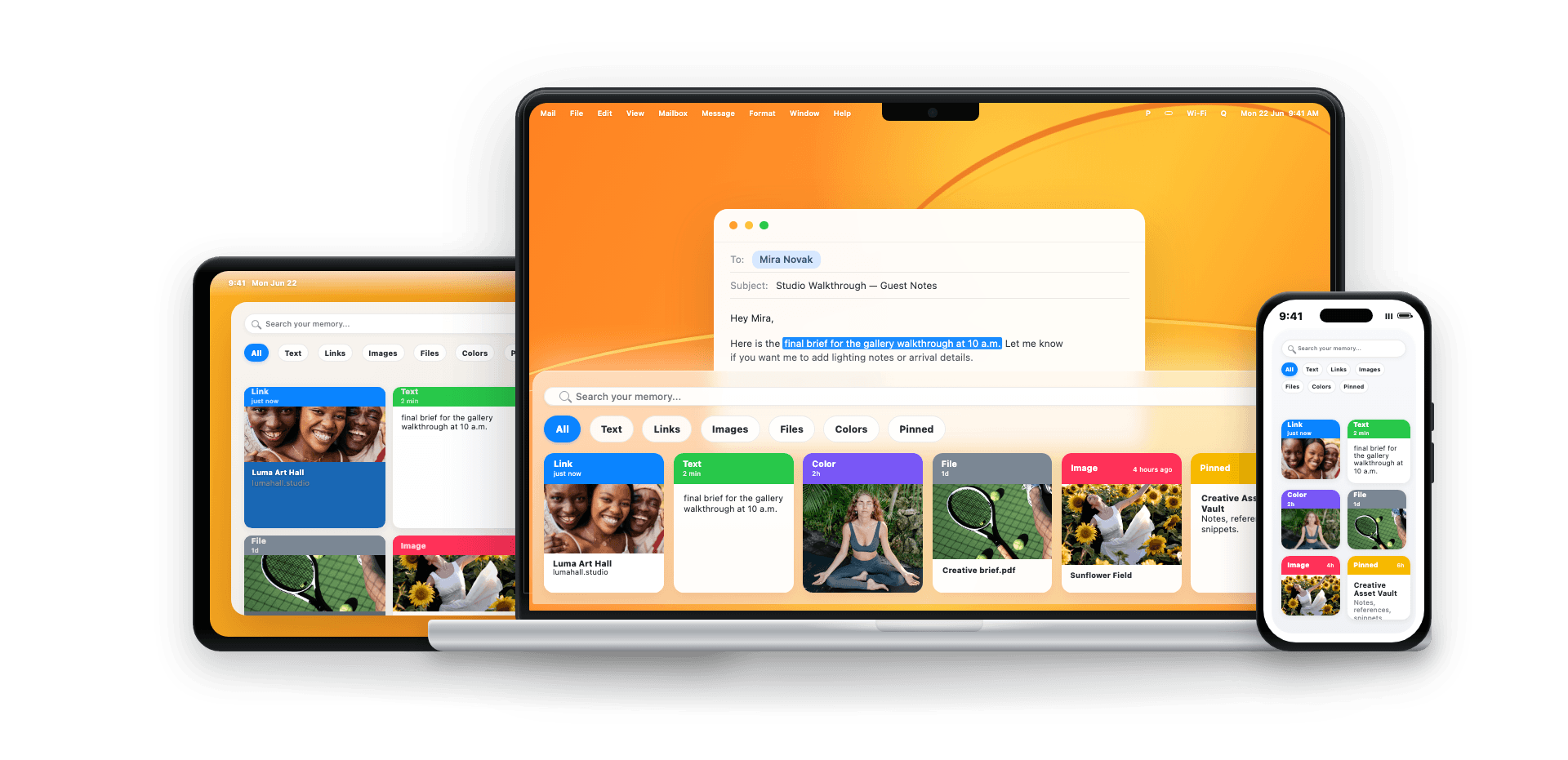
Native clipboard memory app for Mac and iPhone users — From a one-item clipboard to working memory 1
02

A macOS workflow that stays out of the way

The Mac application lives in the menu bar and works quietly in the background. A global quick panel opens with Command–Shift–V, so the user can search the latest items without navigating away from the task in front of them.

Keyboard navigation, click-to-copy, Enter or double-click to paste, and Option–Enter for plain text cover both quick retrieval and deliberate reuse. The interaction is designed to feel like an extension of macOS rather than another destination that must be managed.

  • Menu-bar application with global quick access
  • Search and keyboard navigation
  • Copy, paste and paste-as-plain-text actions
  • Native behavior across everyday Mac applications

Business result: a repeated recovery action takes seconds and remains inside the current workflow instead of opening a new search journey.

03

Organization without turning memory into administration

Not every copied item deserves permanent storage, so we designed several lightweight levels of intent. Pinned, Loved and Saved make valuable items easy to return to, while Boards group material around a client, topic or active project.

The system keeps these actions visible on every item and supports fast filtering. Users can create useful structure when it helps, but the default history still works without requiring folders, naming conventions or a cleanup ritual.

  • Pinned, Loved and Saved states
  • Boards for projects, clients and recurring work
  • Fast filters across current and retained items
  • Organization available at the point of use

Business result: repeated answers, links and assets become reusable team knowledge instead of being reconstructed for every task.

04

Retention, recovery and reminders built around intent

We gave users explicit control over how long ordinary history remains available, with 30, 60, 90, 120-day and unlimited retention options. Pinned items, board content and items with reminders are protected from routine cleanup because the user has already signaled their value.

Deleted content remains recoverable for 30 days, reducing the cost of accidental cleanup. Contextual reminders can bring an item back at the right moment while notification content stays deliberately limited so private clipboard data is not exposed on a locked screen.

  • Configurable retention and automatic cleanup
  • Protection for intentional content
  • Thirty-day recovery from Deleted
  • Local reminders with privacy-aware notifications

Business result: the archive remains useful without growing indefinitely, while accidental deletion and forgotten follow-ups become recoverable events.

05

A native iPhone companion, not background surveillance

iOS imposes different platform and privacy boundaries than macOS, so we did not imitate continuous clipboard monitoring. The mobile app uses an explicit Add from clipboard action and gives the user direct control over what enters SyncPocket.

The same memory, boards and item states remain available in a touch-first interface. This creates continuity between desk and mobile work while respecting Apple platform behavior and avoiding misleading claims about background access.

  • Explicit clipboard import on iPhone
  • Touch-first history, search and organization
  • Shared product language across Mac and iPhone
  • Platform behavior aligned with Apple privacy expectations

Business result: important working material can move between contexts without introducing a mobile interaction that feels invasive or unpredictable.

06

Local-first privacy designed into the product

Clipboard history can contain sensitive client, account and internal information. We therefore treated privacy as product architecture, not a settings-page promise. Core data is stored locally, users can exclude selected applications and the capture layer uses best-effort checks for content marked as sensitive by source apps.

Archive updates and backups are written defensively to reduce corruption risk. The design also avoids showing item content in reminder notifications by default and makes retention visible, giving users practical control over what remains on the device.

  • Local-first storage and processing
  • Application exclusion controls
  • Best-effort handling of sensitive clipboard markers
  • Atomic archive updates, backups and controlled notification content

Business result: teams can gain the speed of clipboard history while reducing unnecessary exposure of everyday working data.

07

One product core across macOS and iOS

We separated shared product logic from platform-specific interfaces. MemoryKit provides common models, storage rules, search, retention and synchronization behavior, while the macOS and iOS applications use the interaction patterns appropriate to each device.

This architecture keeps business rules consistent and makes future features less expensive to implement twice. Platform code can evolve around menu-bar behavior, keyboard actions or mobile permissions without duplicating the underlying product model.

  • Shared MemoryKit domain layer
  • Separate native interfaces for macOS and iOS
  • Consistent models for items, boards and retention
  • A foundation for adding features without parallel business logic

Business result: a multi-device native product can develop faster while maintaining one reliable definition of data and behavior.

08

Private Apple synchronization with an explicit release boundary

The synchronization engine is designed around the user's private CloudKit database so their archive is not turned into a public DGBA account system. Conflict handling and shared identifiers preserve continuity between Apple devices while local storage remains the primary working layer.

A production synchronization claim depends on a correctly signed Apple build, entitlements, the production CloudKit container and validation on at least two physical devices. We keep that boundary visible: the product architecture and engine are implemented, while every distributed release must pass the Apple environment validation before sync is presented as guaranteed.

  • Private CloudKit database architecture
  • Stable identifiers and conflict-aware updates
  • Local-first behavior during connectivity changes
  • Signed-build and multi-device production validation

Business result: cross-device continuity can be delivered without DGBA becoming the default custodian of each user's clipboard archive.

09

Native engineering, localization and release quality

SyncPocket is built in Swift with SwiftUI, AppKit and UIKit where the platform requires deeper native behavior. The interface, menu-bar lifecycle, keyboard handling, clipboard formats, mobile permissions and data layer are tested as product systems rather than assembled as a wrapped website.

English and Polish localization are part of the same source model. Automated tests cover shared logic and critical state transitions, while release work includes signed-build checks, device behavior, accessibility and the differences between light and dark system appearance.

  • Swift, SwiftUI, AppKit and UIKit
  • English and Polish product localization
  • Tests for shared logic and critical workflows
  • Signed-build, device, accessibility and appearance checks

Business result: the product feels at home on Apple devices and has a maintainable base for commercial distribution rather than a short-lived prototype.

10

Measuring saved work and adapting the pattern

The value of clipboard memory can be measured through recovery frequency, time to retrieve an item and the number of searches or repeated actions avoided. An illustrative model of 20 people recovering eight items per day, saving 30 seconds each over 20 working days, equals roughly 53 hours returned to the team each month. It is a model to validate, not a guaranteed result.

The same product pattern can be adapted for teams that repeatedly reuse answers, assets, identifiers or research fragments. A client implementation can add company policies, managed configuration, approved shared libraries or integrations while preserving a clear boundary around personal clipboard data.

  • Baseline recovery and retrieval-time measurement
  • Role-specific pilots for sales, support, design and operations
  • Optional managed policies and shared knowledge layers
  • Scale decisions based on observed workflow value

Business result: investment can be tied to measured time recovered from everyday work and expanded only where the product demonstrates real adoption.

Build with DGBA

Need a platform built around your offer and operations?

We connect strategy, UX/UI, development, integrations and launch in one delivery team.

Start a project